ASUS Republic of Gamers has introduced the new ROG Strix Aiolos SSD Enclosure, targeting gamers, creators, and power users who demand blazing-fast external storage. With 20Gbps USB-C connectivity, NVMe and SATA support, advanced cooling, and Aura RGB lighting, this enclosure promises both performance and style. Moreover, its tool-free design and ROG software integration make storage management simple and efficient.
ASUS ROG Strix Aiolos SSD Enclosure Design and Performance
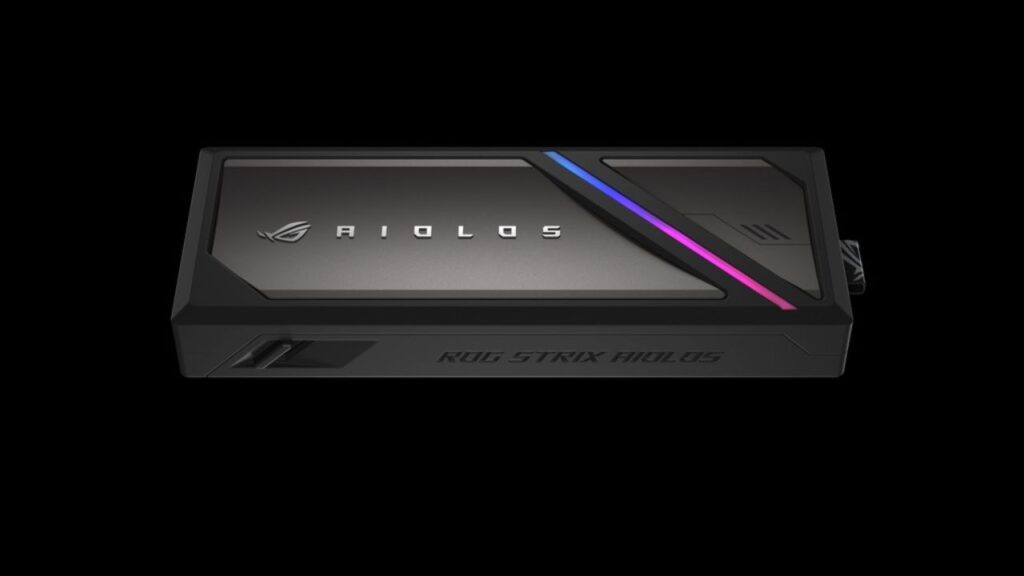
ASUS has officially introduced the ROG Strix Aiolos SSD Enclosure under its Republic of Gamers lineup, and it clearly targets users who care about both speed and durability. While many external SSD enclosures focus only on portability, ASUS has prioritized performance, thermal efficiency, and long-term reliability.
The enclosure uses a USB 3.2 Gen 2×2 Type-C interface, and as a result, it delivers transfer speeds of up to 20Gbps. This means you can move massive game libraries, 4K raw footage, or full system backups in significantly less time. Moreover, the high bandwidth ensures stable throughput even during extended data transfers.
Because modern users often work with large file sizes, this speed advantage becomes practical rather than theoretical. Therefore, whether you’re a gamer, content creator, or IT professional, the Aiolos enclosure ensures your workflow remains smooth and efficient.
NVMe and SATA SSD Compatibility
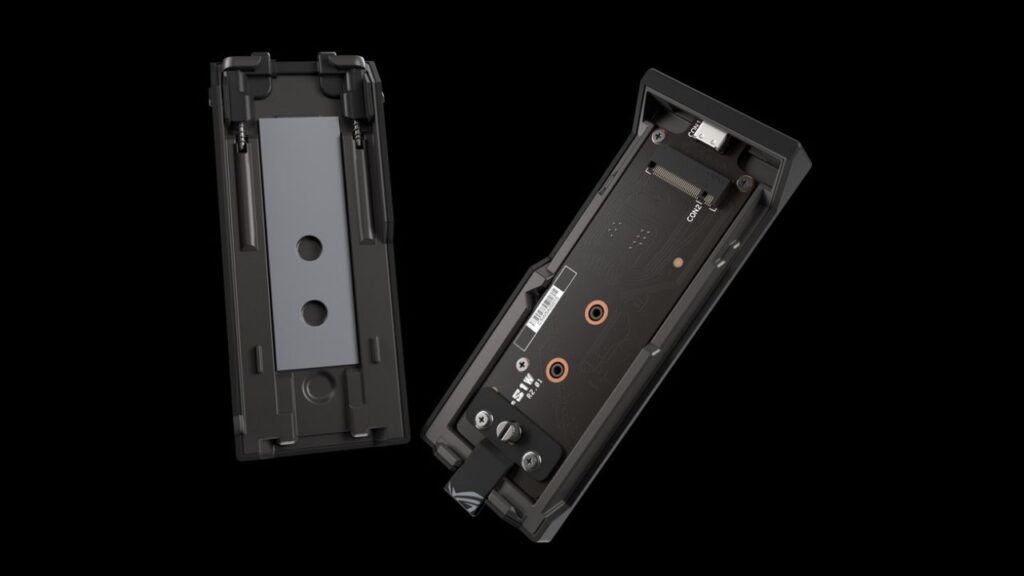
One of the strongest advantages of the ROG Strix Aiolos lies in its broad SSD compatibility. It supports M.2 PCIe NVMe SSDs in 2280, 2260, and 2242 form factors. Additionally, it also supports M.2 SATA SSDs with B+M key configuration.
This dual compatibility gives users flexibility. For instance, you can install a newer high-speed NVMe drive for maximum performance. On the other hand, you can reuse an older SATA M.2 SSD without purchasing a separate enclosure. Consequently, the Aiolos helps reduce extra costs while extending the life of existing storage hardware.
Because of this versatility, the enclosure becomes suitable for both upgrades and backup use cases. Moreover, professionals who frequently swap drives will appreciate the wide support range.
ROG SSD Dashboard and Storage Monitoring
ASUS includes its dedicated ROG SSD Dashboard software for real-time monitoring. Instead of relying on third-party utilities, users can check SSD health, performance metrics, and operational status directly through a dedicated interface.
Furthermore, the dashboard provides a clean and intuitive layout tailored specifically for ROG enclosures. As a result, users can quickly monitor drive temperatures, remaining lifespan, and usage data without technical complications.
For power users and gamers, this level of transparency improves long-term storage management. Therefore, you can proactively manage SSD health and avoid unexpected performance drops.
Advanced Cooling System for Stable Performance
Thermal management plays a critical role in SSD performance, especially during sustained workloads. Fortunately, ASUS has implemented a dual-layer cooling design in the Aiolos enclosure.
Inside, a high-efficiency thermal pad directly transfers heat away from the SSD. As a result, the drive maintains stable performance even during long file transfers or gaming sessions. Meanwhile, the exterior features a heat-resistant liquid silicone rubber coating. This layer not only improves grip but also protects against dust and smudges.
Because of this layered approach, the enclosure stays cool to the touch during extended use. Consequently, users experience fewer thermal throttling issues, which often affect high-speed NVMe drives inside compact enclosures.
Aura RGB Lighting and Tool-Free Installation
Beyond performance, ASUS adds a premium touch with customizable Aura RGB lighting. Users can control the lighting effects through a web-based interface, which makes customization simple and accessible.
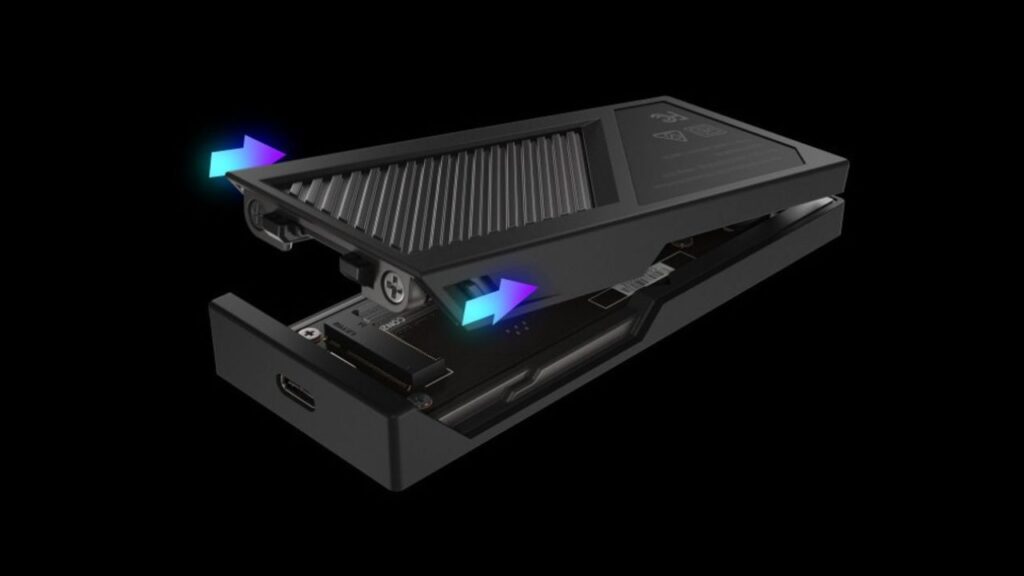
Additionally, the enclosure features a tool-free push-to-open design. Therefore, installing or swapping an SSD takes only a few seconds. This mechanism particularly benefits users who frequently change drives for different projects or backups.
ASUS also enhances portability. The enclosure includes a reinforced metal hook with a fabric tag that offers five times the tensile durability compared to the hook used on the ROG Strix Arion. Moreover, the company bundles an ROG strap and a braided USB-C cable for added durability and long-term reliability.
Specifications and System Compatibility
| Feature | Details |
|---|---|
| Interface | USB 3.2 Gen 2×2 Type-C (20Gbps) |
| Supported SSDs | M.2 NVMe (2280/2260/2242) and M.2 SATA (B+M key) |
| Cooling | Dual-layer thermal pad + silicone exterior |
| Lighting | Customizable Aura RGB |
| Dimensions | 115.5 × 46 × 15.12 mm |
| Weight | 139 g |
| OS Support | Windows 10, Windows 11, macOS 14.4+ |
| Operating Temperature | 0°C to 40°C |
| Storage Temperature | -40°C to 60°C |
| Power Input | 5V DC |
The enclosure remains compact at just 139 grams, which makes it easy to carry in a backpack or laptop sleeve. Moreover, its wide OS compatibility ensures seamless operation across Windows and macOS devices.
As of now, ASUS has not announced official pricing or availability. However, considering its premium ROG branding and feature set, it will likely target gamers and professionals seeking high-performance external storage solutions.
Pricing and Availability
ASUS has not yet revealed official pricing or market availability details for the ROG Strix Aiolos SSD Enclosure. However, given its premium positioning within the ROG ecosystem, it will likely target enthusiasts and professional users seeking high-speed portable storage.
As soon as ASUS announces pricing and regional availability, buyers will gain a clearer picture of its competitive positioning against other 20Gbps SSD enclosures in the market.
Conclusion
The ASUS ROG Strix Aiolos SSD Enclosure stands out as a performance-focused external storage solution built for gamers and creators. With 20Gbps USB-C connectivity, broad NVMe and SATA compatibility, advanced cooling, Aura RGB lighting, and a tool-free design, it combines speed with convenience. Moreover, the inclusion of the ROG SSD Dashboard enhances usability and monitoring. Overall, the Aiolos appears well-suited for users who demand high-speed data transfers without compromising thermal stability or build quality.
FAQs
What is the maximum speed of ASUS ROG Strix Aiolos SSD Enclosure?
The enclosure supports USB 3.2 Gen 2×2 Type-C interface and delivers transfer speeds up to 20Gbps.
Does ROG Strix Aiolos support both NVMe and SATA SSDs?
Yes, it supports M.2 PCIe NVMe (2280/2260/2242) and M.2 SATA SSDs with B+M key configuration.
Is the ASUS ROG Strix Aiolos tool-free?
Yes, it features a push-to-open tool-free design for quick and easy SSD installation or swapping.
How does the cooling system work in the Aiolos enclosure?
It uses a dual-layer cooling system with a high-efficiency thermal pad and heat-resistant silicone exterior to reduce thermal throttling.
Is pricing announced for ASUS ROG Strix Aiolos SSD Enclosure?
No, ASUS has not officially revealed pricing or availability details yet.
Apart from this, on Phone Khabri, we will bring you every new update related to the ASUS ROG Strix Aiolos SSD Enclosure, pricing details, and availability coverage. So, stay connected with us.
(Source)